

Spinpeak Casino Mobile App
The mobile version of the casino allows players to access slots, live tables and promotions directly through a smartphone browser. Android and iPhone users do not need to install a separate application: an internet connection and the website address are all that is required. Once logged in, players can access their balance, payment history and profile settings. Spinpeak Casino adapts the main lobby elements for touchscreens, making it possible to move from searching for a game to the cashier within the same website.
What Is Available on a Smaller Screen
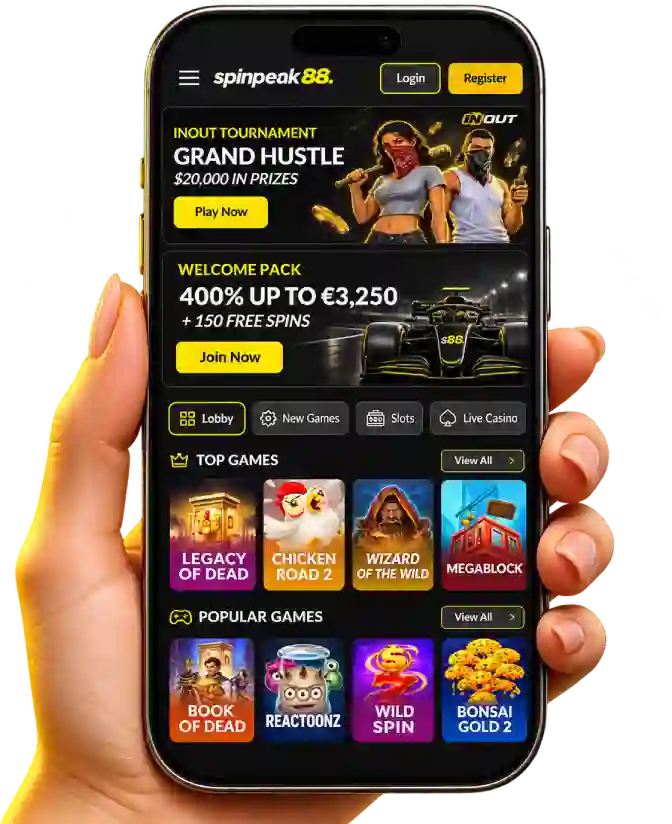
The Spinpeak Casino mobile interface features a top navigation bar with the menu, Login and Register buttons, followed by promotions, game categories and featured collections. The Lobby, New Games, Slots and Live Casino buttons provide direct access to different gaming formats. The Top Games and Popular Games sections include a View All option for opening the complete selection, eliminating the need to scroll through the homepage to find individual titles.
| Feature | Mobile Capabilities |
|---|---|
| Devices | Android, iPhone and tablets via browser |
| Main menu | Lobby, New Games, Slots, Live Casino |
| Game selection | Top Games, Popular Games collections and the View All button |
| Account | Login, Register, personal details and balance |
| Promotions | Welcome Pack, Free Spins and other available offers |
| Payments | Cashier, payment methods and transaction history |
The name Spinpeak Casino Mobile App refers to the platform's mobile format, although no separate official downloadable application has been announced. The main access method is the responsive website, which can be opened through Safari, Chrome or another modern browser. This provides familiar features without searching for installation files or application updates.
Three Steps to Getting Started on Your Phone
Getting started through a mobile browser is straightforward, even for players who have previously used only a computer. Spinpeak does not require a second profile for another device: once logged in, the same account information becomes available. The following steps explain how to reach the gaming catalogue rather than repeating the desktop registration process.
- 1
Open the Mobile Lobby
Launch your phone's browser, visit the website and use the menu to select Slots or Live Casino.
- 2
Log In or Register
Select Login for an existing account or Register for a new one, complete the required fields and check that the currency is set to EUR.
- 3
Prepare Your Gaming Session
Review the available games, account balance and bonus conditions, set a budget and only then proceed to playing.
Slots and Live Tables Designed for Touchscreens
Game cards at Spinpeak Casino are arranged in compact rows, with covers and titles clearly visible on smartphone screens. Featured releases include Book of Dead, Reactoonz, Wild Spin and Bonsai Gold 2. The top selection also includes Legacy of Dead, Chicken Road 2, Wizard of the Wild and Megablock. Selecting a game card launches the title with the controls provided by its developer.
For players who enjoy live streams, Spinpeak Casino provides mobile access to Live Casino. Available titles include Auto Roulette, Roulette A, Speed Blackjack A and Blackjack 360 Midnight. Portrait orientation is convenient for browsing menus, while landscape mode may provide more space for video streams and betting panels at certain live tables. A stable Wi-Fi or mobile internet connection is particularly important during dealer broadcasts.
- Slots — reel-based games featuring bonus rounds and free spins according to each title's rules.
- Live Casino — roulette and blackjack with betting interfaces and live table streams.
- Instant Games — short rounds featuring titles such as Plinko, Minesweeper and Rocket Dice.
Promotions and Cashier Access Without a Computer
Bonus cards appear near the top of the mobile lobby. One Spinpeak88 Casino banner features a Welcome Pack worth up to €3250 and 150 Free Spins across four deposits. Players can check the amount and wagering requirements for each stage before accessing the cashier. The first deposit offers 150% up to €1000 and 100 spins, with a minimum qualifying deposit of €20.
The Spinpeak Casino Mobile App mobile account interface allows players to move between promotional information and available payment options directly through their browser. Depending on account settings, the cashier may display Visa, Mastercard, Apple Pay, MiFinity and cryptocurrency methods. The minimum deposit and withdrawal request amounts are both €20. Completed transactions and their statuses can be checked in the account history.
| Mobile Action | What to Check |
|---|---|
| Welcome bonus | Deposit number, amount, Free Spins and expiry date |
| Deposit | EUR currency, available method and amount from €20 |
| Withdrawal | Payment details, identity verification and request status |
| History | Date, amount and status of each transaction |
Quick Access, Data Protection and Support
To open Spinpeak Casino Mobile App with a single tap, players can create a website shortcut on their home screen. On an iPhone using Safari, open the Share menu and select Add to Home Screen. On Android using Chrome, open the browser menu and choose Add to Home screen. The shortcut opens the website and does not install a separate casino application.
For mobile authentication, Spinpeak Casino uses existing account credentials. Store your password in a secure password manager, never share verification codes and always log out when using someone else's device. Questions about account access, verification or payments can be addressed through 24/7 live chat or email support. If a page does not display correctly, update your browser, check your connection and reopen the relevant section.
- Create a website shortcut if you regularly return to the mobile lobby.
- Check screen orientation and connection quality before joining a live gaming session.
- Review your balance, time limits and personal restrictions before playing.
Returning to Your Mobile Account
For subsequent visits to Spinpeak Casino, simply open your saved shortcut or browser tab, select Login and navigate to the required category. The mobile lobby combines game collections, the cashier and account features, with navigation available without installing an application. Start by checking your account settings and choosing the most comfortable way to use the platform on your smartphone.
FAQ
Can I continue playing on my smartphone after starting a session on a computer?
The same Spinpeak Casino account is used to sign in from both computers and smartphones. Your balance, bonus rewards and transaction history are linked to your profile, so you can continue using the casino after logging in on another device. To return to a particular game, find it in the mobile catalogue. Whether an unfinished round can be resumed depends on the provider, so check your balance and game history before placing another bet.
Do I need to verify my identity again when logging in from a smartphone for the first time?
Using a new device does not automatically mean that you must complete the full KYC verification process again. However, the security system may request additional login confirmation or account credential checks. If your documents have already been successfully verified, uploading them again is generally unnecessary unless specifically requested. For secure authentication, it is advisable to use your personal smartphone and keep your contact details up to date.
How can I check whether a particular slot is available on mobile?
Open the mobile lobby and find the required title using the search function or its relevant game category. The Spinpeak catalogue contains thousands of games, most of which are adapted for smartphones. If a slot appears in the mobile catalogue, open its game card and check whether it launches in your browser. The availability of individual releases depends on the developer, region and technical compatibility of your device.
Can I deposit using Apple Pay without entering my card details?
Apple Pay is among the payment methods supported by Spinpeak Casino. If this option is available in your account's cashier, you can select it when depositing and confirm the transaction using the standard Apple Pay authentication process. This allows you to use a card stored in Apple Wallet without manually entering its details again on the payment page. The minimum deposit is €20, while availability depends on your country and payment settings.
How can I check the remaining wagering requirements for an active bonus on my smartphone?
After logging in, open your personal account and navigate to the details of your active bonus offer. The welcome package carries a 30x wagering requirement on the combined bonus amount and qualifying deposit, while Free Spins winnings require 40x wagering. For example, a €20 deposit with a 150% bonus provides €30 in bonus funds. In this case, the calculated wagering turnover is (€20 + €30) × 30 = €1500. Actual progress should be checked against the information displayed in your bonus balance.
Can I contact support without interrupting my mobile gaming session?
The mobile version provides access to live chat, where players can ask questions about accounts, bonuses or payments. Customer support is available around the clock. If your enquiry concerns a particular game round, prepare the game title, approximate time and stake amount in advance. It is advisable to complete any active round before opening the chat to avoid interrupting gameplay. More detailed enquiries can also be submitted by email.