

Spinpeak Casino Login
The personal account brings together access to games, account balance, bonus rewards and payment history. New users only need to complete the registration form and confirm their contact details, while existing account holders can log in from a computer or smartphone. Spinpeak allows players to move between the gaming lobby and account settings without creating a new profile. Below, you can find information about registration, account recovery and preparing for identity verification.
Essential Information About Account Access
Before completing the registration form, prepare a valid email address, personal details and a password. Spinpeak provides separate login and registration forms, so returning visitors do not need to create another account.
| Feature | Information |
|---|---|
| Account creation | Sign Up form |
| Returning users | Login form |
| Required details | Email address, password, personal information |
| Verification | Contact details and KYC where required |
| Devices | Desktop, Android, iOS, tablet |
| Assistance | 24/7 live chat, email |
Creating an Account Without Unnecessary Steps
The registration process begins with the Sign Up button. The form requires players to provide the requested personal and contact information, select an available country and currency if these fields are included, and create a password. Names and other personal details should match official documents to make subsequent verification easier. Spinpeak uses a single registration form to create a permanent account rather than requiring a separate profile for each gaming section.
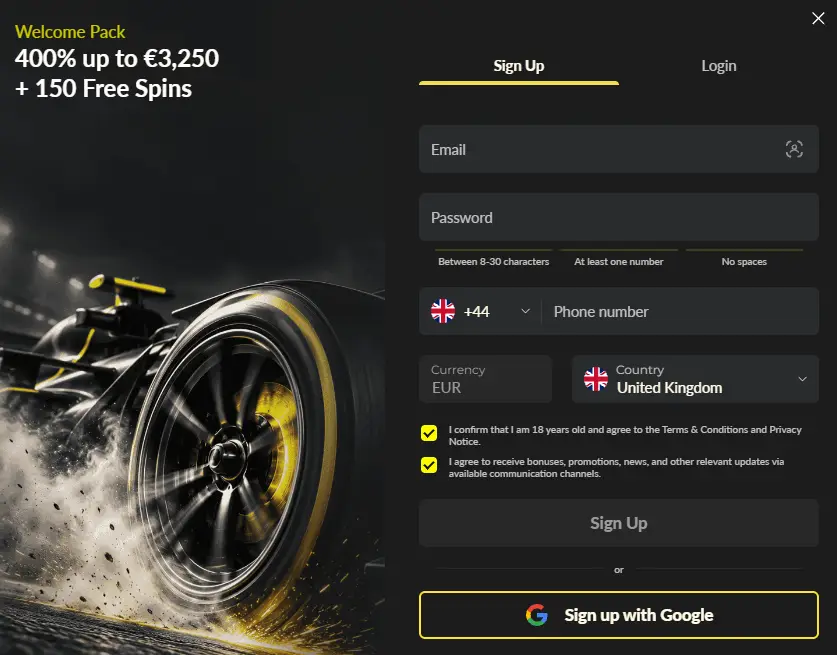
- Open Sign Up and complete the form without abbreviating your personal details.
- Enter your email address, create a strong password and check that all information is correct.
- Read the terms and conditions, confirm the required agreements and complete registration.
- Check for a contact verification message, then access your personal account.
After your first login, check your email address and personal information, then open the settings and cashier sections. Bonus allocation depends on the rules of the selected promotion.
Returning to the Lobby Through the Login Form
The Spinpeak Casino Login section is designed for players who have already completed registration. Enter the email address linked to your account and your password, then confirm the login. Once signed in, you can access your personal balance, game categories, transaction history and available bonuses. The process is similar on smartphones: the form opens in a mobile browser without requiring a separate application.
When using a shared computer, log out after playing and avoid saving your password in the browser. A password manager is suitable for personal devices, and the same account can be accessed from different screen sizes.
Changing Your Password and Recovering Account Access
If you have forgotten your password, use the recovery function on the login page. This usually involves entering the email address associated with your account and following the instructions in the message you receive. Before creating a new password, make sure the recovery link comes from the expected email rather than an unfamiliar message. Spinpeak Casino Login allows players to return to their existing profiles without registering again.
- Check the spelling of your email address and look in your spam folder.
- Choose a unique combination of characters for your new password that is not used for other accounts.
- After changing your login credentials, sign in again and check that your contact information is up to date.
If you have lost access to your email address, Spinpeak support can explain the procedure for identity verification and updating contact details. Never share passwords or one-time verification codes in live chat.
Identity Verification and Personal Information Settings
KYC verification links an account to its rightful owner and helps ensure that payment transactions are handled correctly. Players may be asked to provide proof of identity, proof of residential address and evidence of ownership of their payment method. Spinpeak may request these documents before processing a withdrawal, so it is useful to prepare clear and up-to-date copies in advance.
| Section or Document | Purpose |
|---|---|
| Identity document | Verification of name and date of birth |
| Proof of address | Verification of registered contact details |
| Payment verification | Confirmation of ownership of the payment method used |
| User profile | Review of personal information and available settings |
Before submitting documents, make sure the text is legible and the name matches your registration details. If necessary, contact support to check the verification status. Spinpeak does not require players to create a new account whenever information needs updating. Instead, users should request changes to their existing profiles.
What You Can Access After Logging In
An account keeps your balance, deposit and payment activities, bonus conditions and personal settings in one place. The cashier displays payment-related activities, while the promotions section shows bonus allocations and their terms of use. Spinpeak also allows players to contact support about login issues, document verification or transactions.
- Review your transaction history and compare amounts against your own records.
- Monitor active bonuses, expiry dates and wagering conditions before starting a gaming session.
- Enquire about personal limits and options for taking breaks from gambling.
To access Spinpeak from a smartphone, simply open the website, sign in and navigate to the required section. Once finished, it is advisable to log out, particularly if other people use the device. The Login form remains the main way to return to personal account features: save the correct website address, check your details and update your password when necessary.
FAQ
Can I change my account currency after completing registration?
Your account currency affects how your balance, deposits, withdrawals and bonus rewards are displayed. If you selected a particular currency during registration, you should contact Spinpeak Casino support to find out whether it can be changed later. Before making a deposit, it is also worth checking the currency of your payment method and any applicable conversion rules to ensure transactions are consistent with your account settings.
What happens to an active bonus after logging out of my account?
Ending a session does not automatically cancel an active bonus offer. After logging in again, you can return to your bonus balance and continue meeting the wagering requirements. However, the reward's expiry period continues regardless of whether you are online. For example, welcome bonuses have a 7-day period during which wagering requirements must be completed.
How should I prepare my account for my first withdrawal?
Before requesting your first withdrawal, it is advisable to check your personal details, complete any required verification and ensure that the payment method belongs to the account holder. You should also consider any outstanding bonus wagering requirements and the minimum withdrawal amount of €20. If you deposited using a method that does not support incoming transfers, customer support can explain the available alternatives for receiving funds.
Can I create a second account to claim another welcome bonus?
Welcome promotions are intended for new users in accordance with the rules of each offer. To participate in subsequent stages of the Welcome Package, you should continue using your existing account, as the package covers four consecutive deposits. If you need to update your contact information or recover access, it is better to use your existing profile settings or contact support rather than register again.
How can I set personal gambling limits through my account?
To manage your gambling activity, you can contact Spinpeak support and enquire about the available responsible gambling tools. These may include deposit limits, session time restrictions, temporary breaks or self-exclusion. Before setting a limit, consider your preferred budget and how long the restriction should remain in place. The conditions for changing or removing restrictions depend on the specific tool.